Instagram without Reels on iPhone
Keep DMs. Skip the Reels scroll.
limitd blocks the Reels scroll, your feed, Stories, Explore and suggested accounts on profiles. Your direct messages (DMs) keep working. You can still watch Reels friends send in chats, or block those too.

Android coming soon
 Scan with your iPhone camera to open limitd in the App Store.
Why not just use Screen Time?
Screen Time can only lock the whole Instagram app, so your messages get locked too. limitd blocks just the scroll: Reels, the feed, Stories and Explore. Your messages, search and profiles keep working.
What is blocked and what stays available
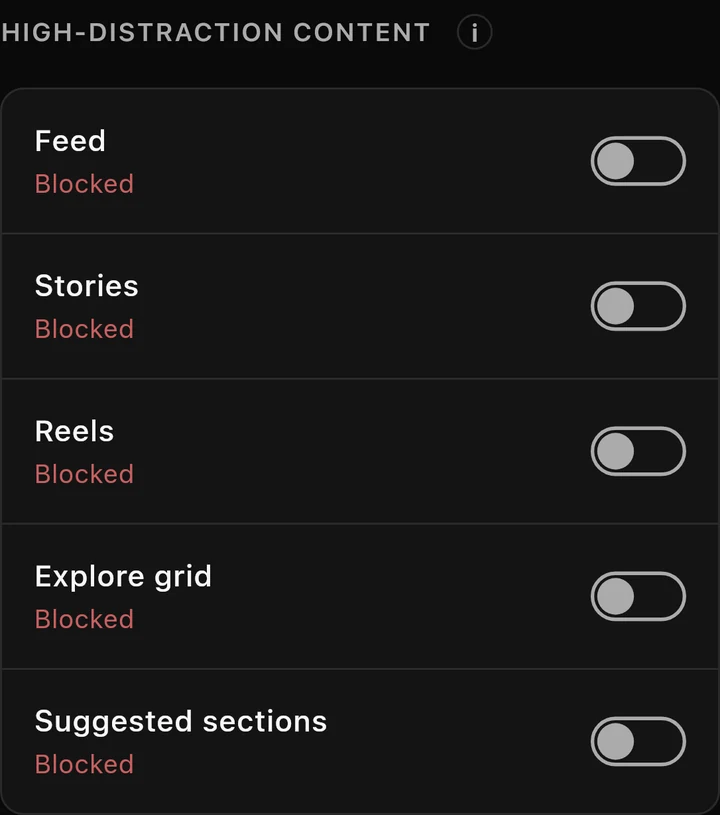
This is how a new account starts. You can change what stays blocked.
| What | At the start | What it covers |
|---|---|---|
| Feed | Blocked | Posts in the Home feed. |
| Stories | Blocked | Rows of Stories and places to open them in Feed, Search, profiles and DMs. |
| Reels | Blocked | The Reels scroll; its tab stays hidden while blocked. |
| Explore grid | Blocked | Photos and videos on the Search tab. You can still search. |
| Suggested sections | Blocked | “Suggested for you” sections on profile pages. |
| Reels shared in DMs | Allowed | Reels someone sends you in a chat. |
| Posts shared in DMs | Allowed | Posts someone sends you in a chat. |
| Individual posts | Allowed | Posts opened from profiles or links. |
| Profile post grids | Allowed | Post grids on profile pages. |
You can keep messaging, searching and looking at profiles. Posts, profile grids and Reels and posts sent in chats start allowed, but you can block those too. Reels sent in chats stay separate from the Reels scroll.

Sign in once. Open your account next time.
- Choose Add account and sign in to Instagram inside limitd.
- limitd saves your account so it’s ready next time.
- Open it from Your accounts, the list on the home screen. New accounts open on messages. Accounts you’ve used before keep your chosen opening tab.
Need help with the login screen? Read Signing in to Instagram inside limitd.

Want a quick look?
Focus Points are a daily allowance you spend to open something for a few minutes. Five minutes of Reels costs 10 points, and when the time's up it's blocked again on its own. Your Focus Level sets how many points you get each day.
See how Focus Points work for the rules.

Before you download
How is limitd different from Screen Time and other app blockers?
Screen Time, and app blockers that use it, lock the whole Instagram app, messages included. limitd works the other way round: it blocks the parts made for endless scrolling, like Reels, the feed, Stories and Explore, and keeps the parts you need, like DMs, search and profiles.
Will limitd stop me doomscrolling?
That's what it's built for. With Reels and the feed blocked, there's no endless feed to get lost in. If you really want a look, you can spend Focus Points to open something for a few minutes, and then it's blocked again on its own.
Does this disable Reels in the Instagram app?
No. Blocking happens inside limitd, and your regular Instagram app stays unchanged. Some Instagram app features aren't available inside limitd.
Is Focus Pass required?
Yes. A paid Focus Pass subscription is required to access the features of this app. Review the subscription options in the app before subscribing.
Can I still get message notifications?
Yes. Turn them on for your account in limitd and allow notifications on your iPhone.
Can I save more than one account?
Yes. Save your accounts and switch between them. Each keeps its own settings. You use one account at a time.
Is limitd on Android?
limitd is on iPhone today; Android is coming soon.
Keep messages. Skip the Reels scroll.
Message friends with the Reels scroll blocked. Choose whether Reels sent in chats stay open too.
Android coming soon
Prefer a conversation-first setup? See Instagram DMs without the feed. Questions? Contact Support.